Build your first personal webpage
Send a request, open the result, and make one targeted revision.
Produce a personal page you can preview locally.
On this page
01Have these three things ready
- A working Codex desktop task.
- An empty practice folder with a confirmed path.
- Your bio, interests, and project text.
Return to the setup lessons if needed. The fictional example below is ready to use.
02Send your first build request
Send the request in the task associated with your practice folder. If a permission prompt appears, read which action it covers.
Create a personal introduction webpage in the current practice folder.

Nickname: Lin.
Bio: Someone who enjoys recording everyday life and exploring new tools.
Interests: photography, hiking, reading.
Project: City Walk Notes — small discoveries from neighborhood walks.

Use HTML and CSS with a warm, light color palette.
Do not use external fonts, images, or services. Do not add sign-in or payments.
Let me open index.html directly in a browser.
When finished, tell me where the files are and check for horizontal overflow at small screen widths.
Work locally only; do not publish.
Expect index.html and possibly a separate CSS file. File count matters less than whether the page opens and meets the request. The prompt above is an English adaptation; the recorded demonstration used the original Chinese request.
03Open and check the page
- Find the generated files.
- Open
index.htmlin a browser. If the implementation needs a local server, ask why and request preview steps. - Check the nickname, bio, interests, and project against the request.
- Narrow the window and look for clipped text or unnecessary horizontal scrolling.
Inspect the actual result even after receiving a completion message. Results can differ between runs.
04Inspect the recorded example
This example was created on October 2, 2026 using the original Chinese request. The person and project are fictional. The image shows the generated webpage, not the Codex interface. Original screenshots and downloads remain in Chinese.
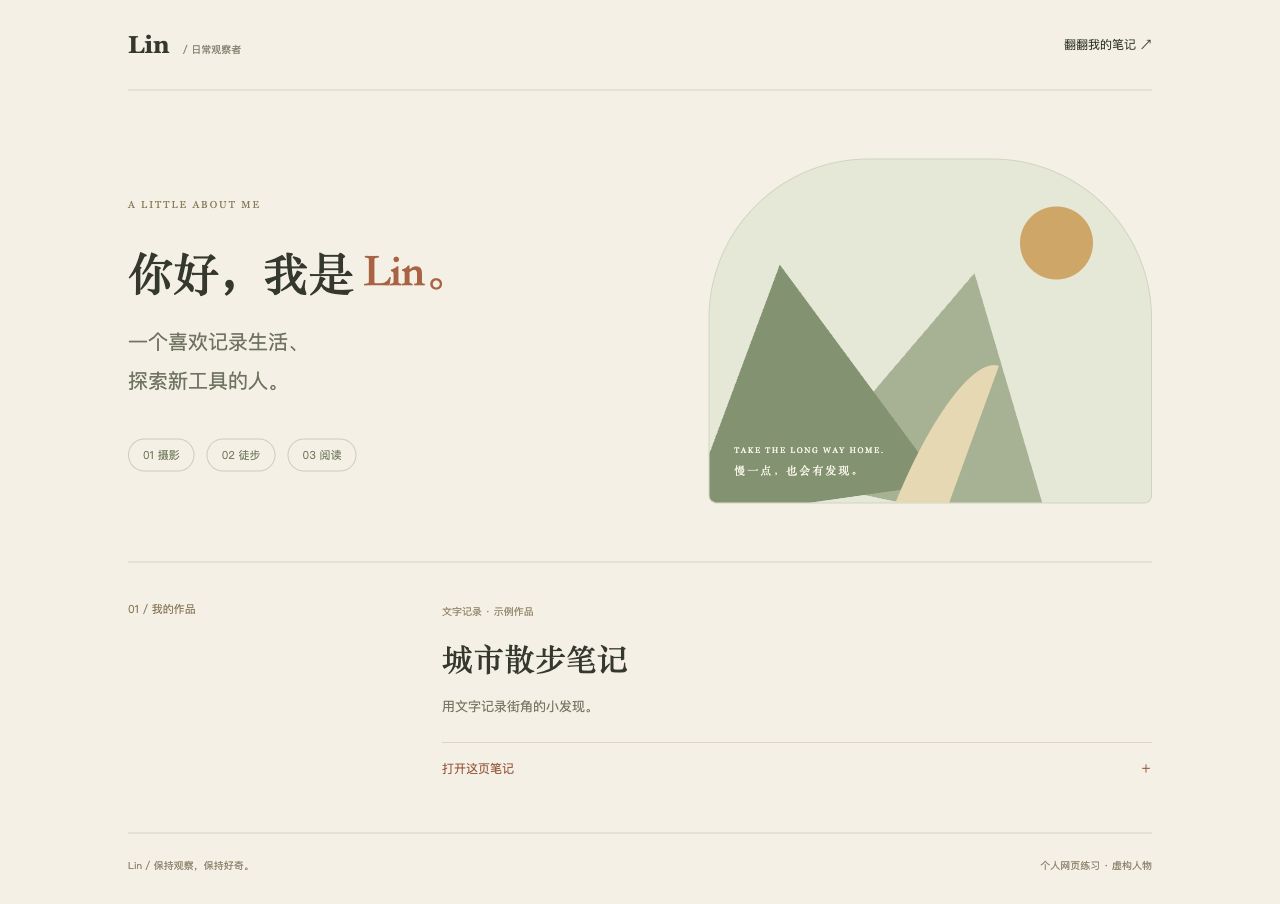
Extract the archive and keep index.html and style.css together. It has no external dependencies. Direct file:// opening was not verified because the automated browser permitted only HTTP/HTTPS. A local preview server is an alternative.
05Make one specific revision
Choose a concrete location and change instead of asking only to “make it look better.”
Slightly enlarge the bio below the nickname and increase the space between the bio and interests. Keep the other content and colors. Then check readability at desktop and phone widths.
Refresh the browser after saving. If the change is missing, check that you opened the latest file.
In the recorded demo, the desktop bio changed from 17px to 20px and the mobile bio from 16px to 18px. Space above the interests increased from 26px to 38px. See before-and-after evidence →
Before you move on
Checklist progress stays in this browser. It is not uploaded or synchronized across devices.
References
Product descriptions refer to the official pages below. Exercises, prompts, and checklists were written for this handbook. Source verification date: 2026-10-02.